

-
Content
If your business accepts payments online, the payment experience can make or break a sale. A clunky checkout process can cause customers to drop off, while a smooth, secure transaction builds trust and drives revenue. That’s where payment gateway integrations come in. They’re the behind-the-scenes connection between your website or booking system and the financial institutions that process payments. In this guide, we’ll break down how payment gateway integrations work, what options are available, and how the right setup can improve your cash flow, boost bookings, and create a better experience for both you and your customers.
What Is a Payment Gateway Integration?
When someone is making a payment online, the payment gateway securely transmits payment details (like a customer’s credit card info) to the payment processor and brings back a response — approved or declined. It’s like a secure tunnel that links you to the banking world. A Payment API (Application Programming Interface) is what connects your software to both the payment gateway and the payment processor.
Integrating directly with a payment gateway enables real-time communication between your booking system and the gateway. This means your system can immediately confirm if a payment was successful and update records automatically. Without a payment gateway integration, your booking system wouldn’t know whether a card was valid or had sufficient funds — leaving you to process payments manually or deal with errors, no-shows, and delays.
How Does a Payment Gateway Integration Work?
In simple terms: the payment gateway captures and passes the info, the payment processor moves the money, and the payment API makes sure it all connects seamlessly and updates your booking system in real-time.
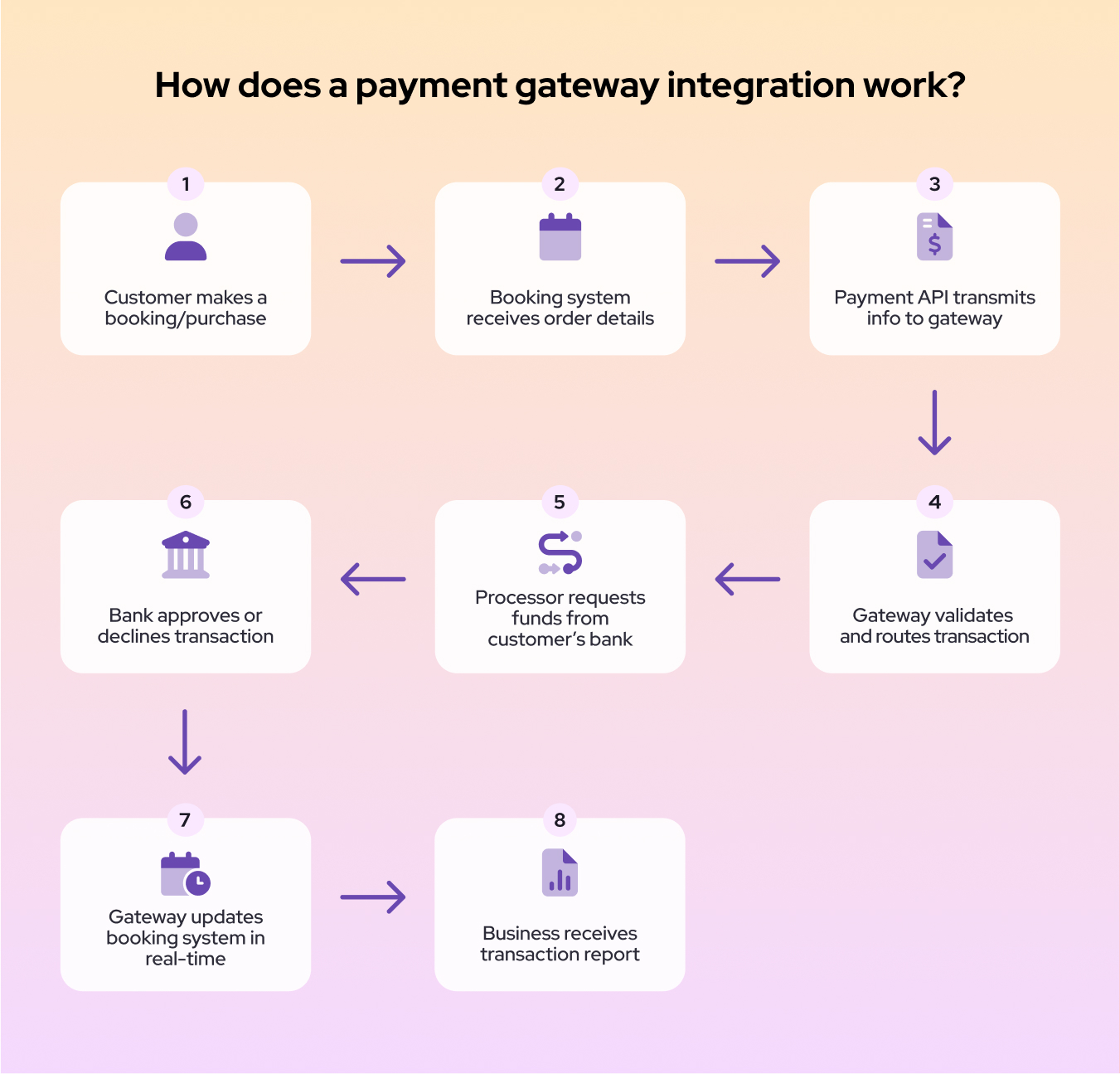
Think of it like ordering a meal at a restaurant:
- You look at the menu and tell the waiter what you want (Booking System)
- The waiter takes your order to the kitchen (Payment API)
- The kitchen checks if the order can be fulfilled (Payment Gateway)
- The chefs prepare the meal and notify the waiter (Payment Processor)
- The waiter brings the meal and lets you know if anything came up (Payment API)
- You enjoy your food, without needing to worry about what happened behind the scenes (Booking System)
At each step in the process, the restaurant logs the activity. At the end of the day, the manager can review which orders were placed, how many were fulfilled, and whether any issues came up — just like your booking system gives you reports and transaction records.
Hosted vs. Self-Hosted Payment Gateway: Which Is Right for You?
Payment gateways can be set up in different ways depending on how much control, customization, and technical setup your business wants.
Hosted Payment Gateway (Low Effort, Low Customization)
With a hosted gateway, your customers are sent to an external site like a secure, branded payment page to complete their payment. The process happens outside of your system and returns once it’s done. This is easier to set up and PCI compliance is handled by the provider, but you lose control over the customer experience and risk higher cart abandonment.
Best for: Solo entrepreneurs, small service providers (like consultants, personal trainers, or tutors), or businesses just starting out — especially those without access to developers or technical resources.
Self-Hosted Payment Gateway (High Control, Higher Responsibility)
A self-hosted gateway lets customers enter their information directly on your website. This gives you full control over branding and user experience, and it’s easier to customize the checkout flow — but it also means more development work and taking on more of the PCI compliance burden.
Best for: Growing service-based businesses (like salons, clinics, or studios) that want a professional, branded checkout experience and are ready to invest in a custom solution.
Example: Booky’s API Integration with Helcim. Booky has implemented a self-hosted integration using Helcim’s API — giving a branded experience without redirecting users away.
Payment Gateway Integration with Plugins or Mobile SDKs
Some gateways offer prebuilt plugins or mobile SDKs that make it easier to integrate payments with common platforms (like WordPress, Shopify, or mobile apps). They’re fast to implement, often don’t require coding, and great for small teams or early-stage MVPs. However, they have limited customization, can be harder to scale or adapt to complex workflows, and may not always match your branding or UX expectations.
Best for: E-commerce shops, online course creators, or app-based startups that need quick launch capabilities and minimal technical setup, but aren’t yet focused on deep customization.
The Benefits of Payment Gateway Integration
Integrated payment gateways let customers complete their booking and payment in one smooth, uninterrupted flow — without pop-ups or redirects. This builds trust, speeds up checkout, and makes it more likely they’ll follow through. It creates a faster, cleaner, and more professional experience that feels modern and trustworthy. This simplicity increases the likelihood that customers will follow through with their booking, boosting your conversion rates and customer satisfaction.
How Integrated Payments Reduce Abandoned Carts and Drive Sales
Every extra step in a checkout process increases the chance someone drops off. Integrated payments reduce friction by making the process quick and seamless — especially on mobile devices. This can lead to higher booking completion rates and more consistent revenue, and reduce your no-shows with the ability to capture payment online.
Other ways integration helps boost sales include:
- Accepting multiple payment methods so customers can pay the way they prefer ACH, debit card, or credit card payments
- Instant payment confirmation, which builds trust and encourages repeat business
- Saving customer payment details securely for fast, one-click checkouts on future visits
- Automated reminders and follow-ups that encourage customers to complete pending payments or rebook
How Integration Supports Automation, Cash Flow, and Reporting
Integrated payment gateways process payments instantly and automatically update your system — speeding up deposits, simplifying refunds, and streamlining daily reporting. This reduces manual work, improves accuracy, and keeps your cash flow predictable — especially helpful in appointment-based businesses where no-shows or cancellations can hurt revenue.
With real-time reporting and transaction tracking built in, you get clear visibility into your sales and cash flow — helping you make smarter business decisions with less hassle.
What Features Should a Modern Payment Gateway Include?
| Support for Multiple Payment Methods | Accept credit and debit cards, digital wallets (Apple Pay, Google Pay), bank transfers (ACH/EFT) and more - so customers can pay how they prefer. |
|---|---|
| Secure Payment Processing | Use strong encryption and tokenization to protect sensitive card data and reduce fraud risk. |
| PCI Compliance | Meet industry security standards to keep your business and customer data safe. |
| Fraud Detection Tools | Features like address verification (AVS), CVV checks, and 3D Secure help reduce fraudulent transactions. |
| Recurring Billing & Subscriptions | Native support for automatic payments, useful for memberships or packages. |
| Refunds & Transaction Management | Ability to issue refunds, void transactions, and pull detailed reports through the gateway interface or API. |
| Customer Data Vaults | Securely save payment info (tokenization) to enable one-click checkouts and easier repeat business. |
| Integration Support | Well-documented APIs, SDKs, and plugins that work smoothly with booking software, e-commerce platforms, and accounting tools. |
| Real-Time Reporting & Notifications | Instant updates on payments, chargebacks, and disputes so you can manage your business proactively. |
| Multi-Currency & International Payments | For businesses with customers outside Canada, the gateway should handle currency conversions and local payment methods. |
What Should You Look for in a Payment Gateway Provider?
When selecting a payment gateway, it’s not just about who can process a payment — it’s about finding a payment processor that meets your business’s specific needs, both now and as you grow. To make the right choice, evaluate providers across a few key criteria: total cost, ease of integration, support for business and technical teams, and long-term scalability. These factors can significantly impact your customer experience, your internal workflows, and your bottom line.
Let’s take a closer look at the most important areas to consider.
Beyond the Transaction Rate: Understand Total Costs
When evaluating payment gateways, it’s important to consider more than just the per-transaction fee. Other costs can include:
- Monthly or Setup Fees: Some providers charge a monthly fee or an initial setup fee for access to their API or gateway services.
- Chargeback Fees: If a customer files a credit card chargeback, the merchant may incur additional chargeback fees from $15–$40. If you're a Helcim merchant, this fee will be refunded to you if you dispute the chargeback successfully.
- Refund Fees: Some gateways charge fees for processing refunds, so it’s good to know if these costs apply.
- Currency Conversion Fees: For international transactions, extra fees might apply when converting currencies.
- Incidental or Hidden Fees: Look out for fees related to failed transactions, statement fees, or fees for additional fraud protection services.
Understanding all these costs helps you choose a payment gateway that fits your budget and business model without surprises.
Developer-Friendly Integrations Make All the Difference
A payment gateway provider that offers multiple integration options makes life easier for businesses and their technical team:
- APIs: Allow deep, customized integration with your booking software or website, enabling tailored payment experiences and automation.
- Plugins: Pre-built add-ons for popular platforms (like WordPress, Shopify, or Booky) let you set up payments quickly without coding.
- Sandbox Environments: Test your payment flows in a risk-free setting with fake transactions, ensuring everything works before going live.
- Clear, detailed documentation: Step-by-step guides, code examples, and FAQs help developers connect the gateway quickly.
- Reliable uptime and performance: A stable service means fewer disruptions during integration and after launch.
For small businesses such as salons, clinics, or retail shops, Booky provides a complete booking and scheduling platform that integrates seamlessly with Helcim for payments. This means your customers can book appointments, pay online, and receive automated confirmations — all without leaving your branded site. With Booky handling the interface and Helcim powering secure payments behind the scenes, you get the benefits of a robust payment API and real-time transaction processing without needing to manage complex technical setups yourself.
Will It Work with Your Existing Tools?
When choosing a payment gateway, ensure it can integrate smoothly with the tools you already use, like your booking system, shopping cart, CRM, or accounting software (ERP). A gateway that plays well with your existing software helps automate payment processing, update customer records, sync sales data, and streamline your business operations without manual work or data errors.
Look for gateways offering:
- Pre-built connectors or plugins for popular platforms
- API support to build custom integrations
- Compatibility with accounting and CRM tools you rely on
This compatibility reduces headaches and saves time, letting you focus on growing your business. See how Booky & Helcim integrate.
How Important Is Customer Support?
Reliable customer support is crucial when choosing a payment gateway, especially during setup and outages or issues. Look for providers offering:
- Multiple support channels (phone, chat, email): If you’re dealing with a customer at checkout and something goes wrong, being able to reach support immediately via phone or chat can prevent a lost sale. Incorporating an AI agent into your support system adds another layer of responsiveness, helping resolve routine issues instantly and keeping the checkout experience smooth.
- Dedicated integration or technical support teams: During setup or when making changes to your integration, access to a knowledgeable developer support team ensures things are done right without unnecessary delays.
- Clear communication about system status and updates: If there's planned downtime or a known issue, proactive alerts help you adjust your operations and avoid customer frustration.
- Knowledge bases and community forums for self-help: For quick questions during setup or troubleshooting, searchable guides and an active user community can save time and reduce reliance on live support.
Reliable support isn’t just a nice-to-have — it gives you peace of mind and helps ensure your payment system stays secure and operational, especially during peak hours or busy seasons.
Can the Payment Solution Scale with Your Business?
As your business grows, so will the complexity and volume of your payment needs. A modern payment gateway should be able to scale alongside you — handling increasing transaction volumes smoothly without compromising speed or reliability. It should also support a wider range of payment methods, currencies, and markets as you expand your customer base. Just as important, it needs to offer flexible APIs and integrations that can adapt to new services, pricing models, or platforms you adopt over time.
Some payment gateways include extra charges for API-based transactions, while others offer full access with no added cost.
- Helcim is one of the few that does not charge extra for API usage — all features are included in its transparent pricing model. This makes it a strong choice for small businesses or SaaS platforms like Booky that want to build their own integration without worrying about surprise fees.
- Square does charge more for online or API transactions compared to in-person payments. If your business is fully online, those fees can add up.
- Stripe doesn’t charge for basic API access, but advanced features like Stripe Billing or Connect come with additional usage-based fees — flexible, but potentially more expensive as your setup becomes more complex.
- PayPal and Braintree offer API integrations, but fees vary depending on which product you use and how you integrate it (e.g., Smart Payment Buttons vs. a full API checkout).
Keeping Online Payments Secure: What You and Your Gateway Need to Do
A secure payment gateway integration protects your business and your customers by ensuring sensitive data is handled safely at every stage of the transaction. Leading providers like Helcim follow strict security protocols and offer features that help reduce fraud, ensure compliance, and keep you protected.
Core Security Features of a Gateway
Modern gateways offer multiple layers of defense:
- Encryption ensures that data sent between your website, the gateway, and the payment processor is unreadable to anyone who tries to intercept it.
- Tokenization replaces sensitive card details with randomized tokens so your systems never store real card numbers.
- PCI-DSS Compliance means the gateway adheres to the highest industry standards for storing, processing, and transmitting card data.
- Secure APIs and HTTPS Webhooks help safeguard data exchanged during transactions.
- 3D Secure Authentication adds an extra identity verification step for customers to reduce chargebacks and unauthorized payments.
- Frequent Security Updates ensure vulnerabilities are patched as new threats emerge.
Built-In Fraud Protection Tools
Most modern gateways also include fraud prevention features to detect suspicious activity before it becomes a problem:
- Address Verification System (AVS) checks whether the billing address matches what the bank has on file.
- Card Verification Value (CVV) requires the card’s security code to confirm physical possession.
- Velocity Checks monitor how many times a card is used within a short time frame to flag possible fraud.
- Fraud Scoring & Risk Analysis use machine learning to flag transactions based on predefined risk factors.
- Blacklist/Whitelist Management lets you allow or block specific IPs, devices, or users.
These tools work behind the scenes to reduce fraud and give you more peace of mind during every transaction.
Your Role in Payment Security: PCI-DSS Responsibilities
While your payment gateway handles much of the heavy lifting, you still have important responsibilities under PCI-DSS (Payment Card Industry Data Security Standard). These include:
- Ensuring your website and booking platform don’t store card data unless fully secured.
- Using secure, tokenized methods through your payment provider's API.
- Maintaining secure environments — such as strong passwords, firewalls, and software updates.
- Restricting access to sensitive payment data within your team and training staff on handling customer info.
- Completing PCI self-assessment questionnaires or audits, as required by your transaction volume and setup.
Best Practices for Ongoing Safety
To maintain a secure integration:
- Use HTTPS on all pages that collect or transmit payment data.
- Keep your software, plugins, and integrations up to date.
- Store API keys securely and never expose them in shared documents or public code repositories.
- Regularly review payment reports and logs to catch errors or fraud early.
- Limit access to sensitive information to only the people who need it.
Working with a PCI-compliant provider like Helcim simplifies many of these steps — but following best practices remains critical for protecting your business and customers alike.
Easily Integrate Payments with Helcim & Booky
Booky is modern, intuitive appointment software built for service-based businesses, making it easy to manage bookings, services / products, clients, reporting, and payments in one place. Helcim’s flexible API lets you integrate secure payments right into Booky — enabling real-time processing, seamless checkout, and automated updates, all with Canadian-based support.
Frequently Asked Questions
What is a payment gateway integration?
A payment gateway integration connects your booking or checkout system to a payment processor using secure APIs, enabling real-time transactions and automated record updates.
What’s the difference between hosted and self-hosted payment gateways?
Hosted gateways (like PayPal) redirect users to an external site, while self-hosted gateways keep the payment flow embedded in your site. Self-hosted gives more control but requires greater technical setup and security.
Can payment integration help reduce no-shows?
Yes — by requiring payment upfront or securely storing cards for late cancellation charges, integrated systems help reduce no-shows and improve reliability.
How does a payment API work?
A payment API acts as a bridge between your software and the gateway/processor, securely transmitting payment information and automating updates to your system in real time.
Is PCI compliance required for small businesses?
Yes — even small businesses need to follow PCI-DSS rules. Using a PCI-compliant provider like Helcim simplifies this process by offloading most of the technical requirements.
Related Articles
-
Refining payment gateway testing for secure transactions
Robert Luong | January 31, 2025
-
Payment links: The “Pay Me Now” button you didn’t know you needed
May Montenegro | December 10, 2024
-
Payment Gateway vs. Merchant Account: What's the Difference?
Kiara Taylor | September 5, 2023
-

Creating Helcim's Online Checkout: A Product Manager's Tale
Ryleigh Stangness | February 23, 2023
-

What is a payment gateway and how can it help your business?
Miranda Russell | September 17, 2022
-

How a hosted payment gateway can help you get paid online
Miranda Russell | November 17, 2020
