
-
Content
Zoho is a great business software that lets you manage every aspect of your business from sales and marketing to finance and human resources. But when the software can do so many things, it specializes in none, especially payment processing. That’s why Zoho payment processing integrations are born to solve the gap that Zoho Billing has.
The right Zoho payment integration can directly affect your cash flow, reconciliation workload, customer experience, and total processing costs. In this article, we will evaluate each Zoho integration option for payment processing, from fees, functionality to set up complexity so that you can make the right decision.
Best Zoho integrations for payment processing in 2026
The best Zoho integrations for payment processing in 2026 are Helcim, Stripe, Razorpay, Payway, GoCardless, and PayU.
| Integration | Zoho app | Integration method | Payment types supported | Online fees | In-person payment support | Surcharging / volume discounts | Key limitations |
|---|---|---|---|---|---|---|---|
| Helcim | Zoho Invoice | Browser-based Payment Extension | Credit cards, ACH, in-person card payments |
|
Yes | Yes (Fee Saver + automatic volume discounts) | Only supports US & Canada businesses |
| Stripe Payment Gateway Extension for Zoho CRM | Zoho CRM | API-based extension (third-party developed) | Credit cards (online only) |
|
No | No | Developed by third party; no in-person payments; no surcharging; no volume discounts |
| GoCardless | Zoho Invoice | Native connection via Zoho settings using API | Bank transfers (ACH / bank debit only) |
|
No | No | 3–5 day settlement; no card payments |
| Authorize.Net for Zoho Billing | Zoho Billing | Native connection via Zoho settings using API | Credit cards, bank payments |
|
No | No | Expensive payment processing fees |
| PayPal for Zoho Commerce | Zoho Commerce | Payment gateway connection (PayPal account link) | PayPal balance, linked bank accounts, credit cards |
|
No | No | Expensive payment processing fees |
1. Helcim (lowest fees)
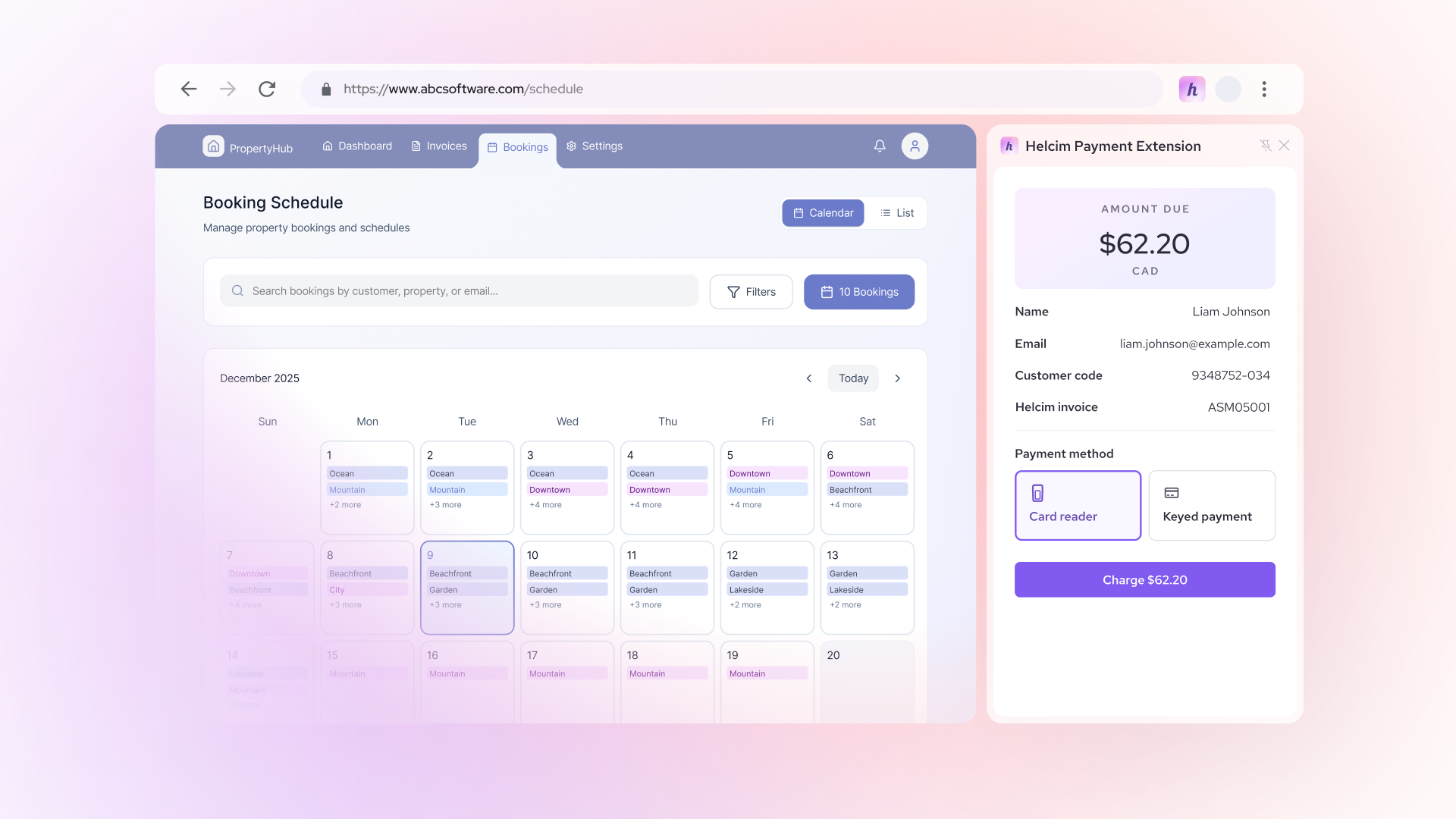
If you’re looking for the most affordable Zoho integration option and don’t need to integrate using a custom code, Helcim is an ideal choice. Helcim integrate with Zoho Invoice using the Helcim Payment Extension, a browser-based tool that lets you process payments directly inside Zoho Invoice or Zoho Books.
Here’s how it work:
- Download the Helcim Payment Extension and register for a free Helcim merchant account.
- Open an invoice in Zoho, and the invoice details automatically sync with Helcim.
- Process payments using Helcim by entering payment details or connecting a Helcim payment device for in-person payments.
- Once the payment is processed, the Zoho invoice is automatically marked as Paid, eliminating the need for manual reconciliation.
The advantage of Helcim and Zoho integration:
- Helcim allows business to accept payments online and in-person through Zoho
- Helcim uses interchange-plus pricing which offers lower fees compared to other integration options. On average, Helcim’s credit card processing fees range from 1.67% + 8¢ to 1.83% + 8¢ for in-person payments, and 2.27% + 25¢ to 2.28% + 25¢ for online payments.
- Helcim reduces its processing markup by 10% to 70% as your payment volume increases. This helps businesses scale without worrying about rising processing costs.
- Helcim Fee Saver, a compliant surcharging tool, lets you pass credit card processing fees to your customers or clients.
- There are no monthly fees, or no setup fees.
- Helcim and Zoho integration is developed by the Helcim team instead of third-party companies like other Zoho integrations. This means businesses can get support directly from Helcim.
The disadvantage of Helcim and Zoho integration: Helcim currently supports businesses based in the United States and Canada. However, businesses can still accept payments in other currencies and receive payouts in USD or CAD. Any currency conversion is handled by the customer’s bank.
2. Stripe Payment Gateway Extension for Zoho CRM
If you’re looking for a Zoho payment integration that supports businesses outside of Canada and the United States, Stripe is one of the most commonly used options. Stripe connects with Zoho using API keys and allows customers to pay invoices through hosted payment pages and customer portals.
Here’s how it works:
- Connect your Stripe account inside Zoho Billing or Zoho Invoice.
- Send invoice payment links to your customers.
- Customers enter their payment details and complete the checkout themselves.
- Zoho automatically records the payment and updates the invoice status.
The advantages of Stripe and Zoho integration:
- Stripe supports businesses operating outside of Canada and the United States.
- You can send single or bulk payment links to your customers.
The disadvantage of Stripe and Zoho integration:
- The Stripe Payment Gateway Extension for Zoho CRM is developed by a third-party provider, Talent Deers, rather than Stripe itself, which may be risky to use.
- Businesses cannot receive direct support from Stripe for fund holds, chargebacks, refunds, or compliance issues related specifically to the Zoho integration, since it is not developed by Stripe.
- Stripe charges 2.9% + 30¢ for each online transaction, which is approximately 27% more expensive than Helcim for many businesses.
- Stripe and Zoho integration does not support in-person transactions.
- Stripe Payment Gateway Extension for Zoho CRM doesn’t support surcharging or volume discount
3. GoCardless
If your business prefers bank transfers and does not accept debit or credit cards, GoCardless is an ideal option. It helps Zoho users collect bank debit payments through Zoho Invoice.
Here’s how it works:
- Connect your GoCardless account inside the Zoho CRM setting.
- Customers authorize a one-time mandate for bank payments.
- Payments are automatically pulled and recorded in Zoho.
The advantages of GoCardless and Zoho integration:
- Bank transfer processing fees are lower than credit card processing fees.
- Bank payments are ideal for high-value invoices, retainers, and recurring B2B payments.
The disadvantages of GoCardless and Zoho integration:
- Settlement times are slower (typically 3–5 business days) compared to card payments (usually 1–2 business days).
- GoCardless only supports bank transfer payments, so customers who prefer to pay by credit card cannot use their preferred payment method.
- GoCardless and Zoho integration does not support in-person transactions.
4. Authorize.Net for Zoho Billing
If your business already uses Authorize.Net or prefers recurring payments for Zoho Billing, then Authorize.net is the good option. It integrates using API through the Zoho Billing setting and supports both one-time and recurring payments.
Here’s how it works:
- Set up Authorize.Net integration in Zoho Billing’s setting.
- Connect your Authorize.Net merchant account using API credentials.
- Enable credit card and bank payment options on invoices or subscriptions.
- Payments are processed through Authorize.Net and automatically recorded in Zoho Billing.
The advantages of Authorize.Net for Zoho Billing:
- Supports both credit cards and bank-based payments, depending on your Authorize.Net setup.
- Works with Zoho Billing’s recurring billing and subscription workflows.
The disadvantages of Authorize.Net for Zoho Billing:
- Authorize.Net charges an expensive payment processing fee of 2.9% + 30¢, for each online transaction, which is approximately 27% more expensive than Helcim for many businesses.
- The setup requires API credentials and is less beginner-friendly.
- Authorize.Net doesn’t offer surcharging or volume discounts
5. PayPal for Zoho Commerce
If you run an online store using Zoho Commerce and want to offer a familiar checkout option, PayPal checkout button is the most recognized one. It allows customers to pay using their PayPal balance or linked bank accounts and credit card to checkout online.
Here’s how it works:
- Install the PayPal integration in the Payment Gateway settings.
- Connect your PayPal business account to Zoho Commerce using Paypal email ID.
- Customers select PayPal at checkout and complete payment on PayPal’s hosted page.
- Payment status syncs back to Zoho Commerce automatically.
The advantages of PayPal and Zoho Commerce integration:
- Paypal is trusted by customers especially for online shopping.
- Allows customers to pay without entering card details directly on your site.
- Supports international payments and multiple currencies.
The disadvantages of PayPal and Zoho Commerce integration:
- Transaction fees are expensive, more than 3%
- Additional fees may apply for currency conversion and cross-border payments.
- Checkout redirects customers away from your site, which can impact conversion.
Zoho payment processing integration vs Zoho Payments
A Zoho payment processing integration connects your Zoho app (Books, Invoice, CRM, Billing, or Commerce) to an external payment provider like Helcim, Stripe, or GoCardless. In simple terms, Zoho handles the invoice, and the payment processor handles the money.
On the other hand, Zoho Payments is Zoho’s own gateway that processes transactions directly within the Zoho ecosystem.
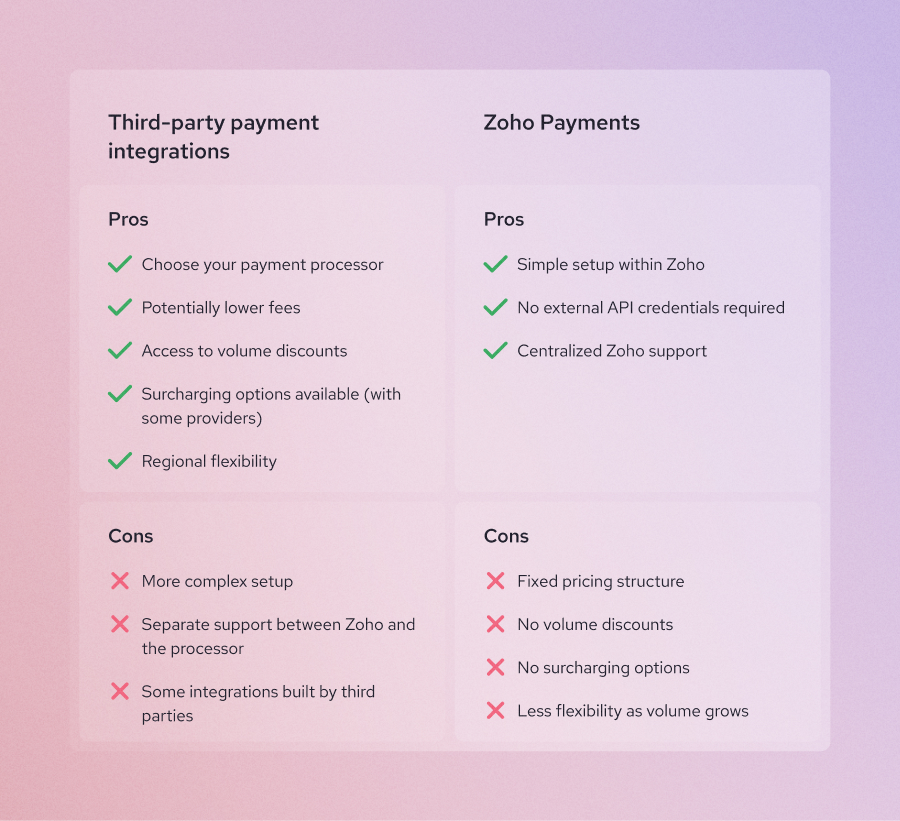
1. The pros and cons of Zoho payment processing integration
Pros: With third-party integrations, fees depend entirely on the processor you choose, which can be lower than Zoho Payments’ fees. The main advantage is flexibility. You can choose the processor with the best rates, volume discounts, surcharging options, or regional support.
Cons: Setup can be more complex because you may need API keys or external login credentials. You may also need to manage support separately between Zoho and the payment provider if issues arise. Some integrated payments are developed by third-party companies rather than by the payment processor or Zoho directly.
2. The pros and cons of Zoho Payments
Pros: Zoho Payments offers a simpler setup because everything is managed within the Zoho ecosystem. You do not need external API credentials or third-party extensions. If you experience any issues, you can contact Zoho support directly for troubleshooting.
Cons: Zoho Payments’ fees are fixed, leaving little room for negotiating lower rates. In addition, Zoho Payments does not support volume discounts, surcharging, or convenience fees like some external payment processors, such as Helcim. Over time, this can increase total payment processing costs for high-volume businesses.
How to choose the best Zoho integration for payment processing
Choosing the best Zoho payment integration is not about picking the most popular name. It’s about matching your business model, customer behavior, and cost sensitivity with the right payment structure. Below is a step-by-step framework to help you decide:
- Identify where your customers are located.
- Decide which payment methods and channels you need.
- Calculate your processing volume to find the most affordable Zoho integration.
Step 1: Identify where your customers are located
Your business location determines which integrations are available to you. Some payment processors, like Helcim, support businesses based in the United States and Canada. Others, like Razorpay and PayU, are primarily designed for India-based merchants.
If you choose a processor that does not support your region, you won’t be able to create a merchant account or integrate it with Zoho.
Step 2: Decide which payment methods you need to accept
Not all integrations support the same payment types. Ask yourself:
- Do your customers prefer credit cards or bank transfer?
- Do your customers often pay in-person or online?
- Which Zoho tools do you use to accept payments (Zoho Billings, Zoho CRM, Zoho Invoice, Zoho Checkout or Zoho Commerce)? Different Zoho tools will have different compatible payment processing integrations.
By knowing the common ways your customers pay and tools that you often use, you can narrow down the list of ideal Zoho payment processing integrations. For example:
- Helcim supports credit cards, debit cards, and bank transfers for both online and in-person transactions. The compatible tools are Zoho Invoice and Zoho Books (via the Helcim Payment Extension).
- GoCardless is ideal if you only want to accept online bank transfer payments. The compatible tool is Zoho Invoice.
- Stripe Payment Gateway Extension for Zoho CRM supports credit cards and debit cards for online transactions. The compatible tool is Zoho CRM.
- Authorize.Net for Zoho Billing supports credit cards and bank-based payments for one-time and recurring transactions. The compatible tool is Zoho Billing.
- PayPal for Zoho Commerce supports PayPal balance payments, linked bank accounts, and credit cards for online checkout. The compatible tool is Zoho Commerce.
Step 3: Calculate your processing volumes to find affordable Zoho integrations
When choosing the best Zoho integration for payment processing for your business, make sure to check:
- Your monthly processing volume.
- Your average transaction size.
- Whether your processor offers volume discounts.
- Whether you can use surcharging.
The payment processing fees listed on Zoho Payments’ or other processors’ websites are not the only factors that affect your profit. If you’re not considering processors like Helcim that offer automatic volume discounts or surcharging, you may be leaving money on the table.
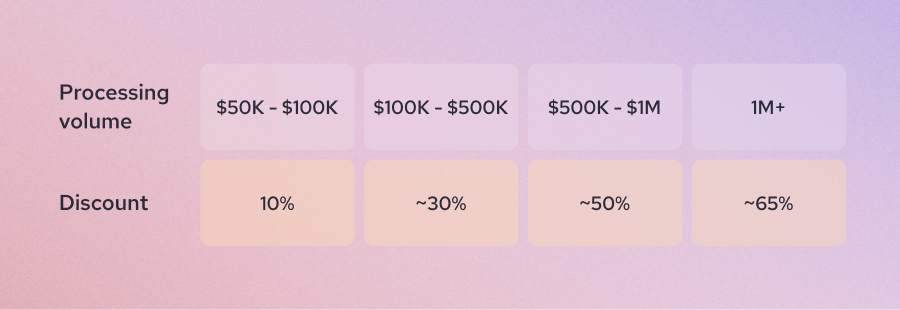
For example, Helcim offers lower processing markups as your volume increases:
- For $50K - $100K: 10% discount
- For $100K - $500K: 30% discount
- For $500K - $1M: 50% discount
- For $1M+: 62.5% to 70% discount
Integrating Helcim with Zoho can help you reduce your overall processing costs as your business grows. To get started, download the Helcim Payment Extension and sign up for a Helcim merchant account.
How much does Zoho payment processing integration cost?
Zoho does not charge a transaction fee for connecting a payment processor. However, that does not mean payment processing is free. The real cost depends on the gateway you choose, your monthly volume, your average transaction size, and whether you use additional Zoho apps like Zoho Billing.
Most Zoho payment integrations charge the fees as following
- Credit card processing fees of Zoho integrated processors typically range from 2.3% to 3% or more per transaction, depending on the provider and pricing model.
- ACH or bank transfer fees of Zoho integrated processors are significantly lower, usually around 0.5% to 1% per transaction, sometimes with a small fixed fee or cap.
Many external payment processors charge additional fees that can impact your bottom line.
- Contract cancellation fees: Some traditional merchant account providers require long-term contracts. If you cancel early, they may charge an early termination fee. Always check whether the processor offers month-to-month pricing or requires a contract.
- PCI compliance fees: Some processors charge monthly or annual PCI compliance fees. These can range from small monthly charges to larger annual assessments. Other processors include PCI compliance at no extra cost.
- Chargeback fees: When a customer disputes a transaction, processors charge a chargeback fee. This typically ranges from $15 to $25 per dispute. Some providers, like Helcim, refund this fee if you win the dispute.
- ACH return or bounce fees: If a bank transfer fails, processors charge a return fee. These usually range from $5 to $25 per returned transaction.
- Subscription fees: Some payment processors charge a monthly merchant service fee, which can range from $15 to over $100 per month.
If you want to avoid extra monthly and hidden fees, you can integrate Zoho with Helcim using the Helcim Payment Extension. Helcim does not charge monthly fees, setup fees, or hidden fees.
FAQ
Does Zoho charge extra for using third-party payment processors?
No, Zoho does not charge an additional transaction fee for connecting third-party payment processors. You only pay the processing fees charged by the payment provider you choose.
What are the transaction fees for Zoho payment integrations?
Transaction fees depend on the processor you select. Most credit card integrations charge between 2.3% and 3%+ per transaction, depending on the pricing model. ACH or bank transfer payments usually cost 0.5% to 1% per transaction, sometimes with a cap. Interchange-plus processors may lower your effective rate as your monthly volume increases.
Can I use multiple payment gateways in Zoho at the same time?
Yes, Zoho supports multiple payment gateways within certain apps like Zoho Billing. However, some Zoho features may limit how payment options appear, such as payment links that prioritize the most recently connected gateway. You should review how each Zoho tool handles multiple integrations before enabling them.
What is the cheapest Zoho payment integration?
The cheapest Zoho payment integration depends on how your customers pay and how much you process each month. For credit card payments, interchange-plus providers like Helcim often offer lower effective rates than flat-rate processors. For high-value B2B invoices, bank transfer offered by Helcim or GoCardless can reduce fees significantly.
Can I pass credit card processing fees to customers in Zoho?
Most native Zoho payment integrations do not support surcharging or convenience fees directly within the platform. However, some external processors, such as Helcim, offer compliant surcharging tools. By integrating Helcim to Zoho, you can pass credit card processing fees to the customers.
Which Zoho payment integration supports in-person payments?
Helcim supports both online and in-person payments through Helcim Smart Terminal and Helcim Card Reader. If you operate both online and physical locations, you should integrate Helcim to Zoho.
Is Zoho Payments cheaper than third-party integrations?
Zoho Payments typically uses flat-rate pricing, which is simple but may not be the lowest-cost option at higher volumes. Some third-party processors like Helcim offer interchange-plus pricing or automatic volume discounts, which can reduce your payment processing fees.
Related Articles
-
How to reduce Zoho payment processing fees
Kaitie Weaver | February 2, 2026
-

Payment gateway integration guide for small businesses
Booky | August 21, 2025